0%

Hive 及相关 SQL笔记

本篇文章记录了,自己在实际工作和学习中遇到的一些问题,算是SQL相关的总结

更多文章欢迎关注公众号:stackoverflow

下面是关于SQL在引擎内部执行的顺序的简易版/必记版:

from 某表,group by 某字段,开窗 ,聚合函数,havingdistinct , order by , limit ,尤其注意当 group by 和 开窗相遇时,一定是分组group by优先

hive的架构

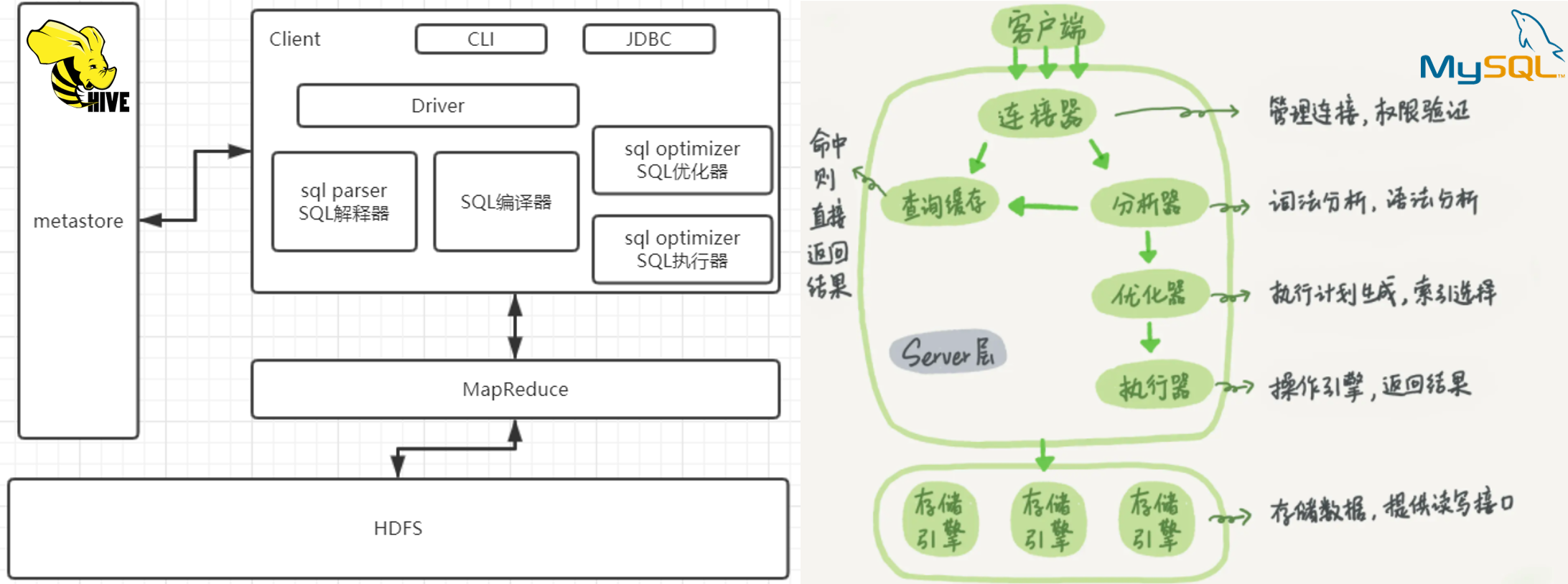
如下图是Hive的架构图,即解析器-编译器-优化器-执行器,区别于MySQL的,连接器-分析器-优化器-执行器

Your image description
Hive架构 VS Mysql架构

Metastrore是存储元数据的数据库,默认使用的是derby,可以更改为MySQL,元数据指的是将结构化数据映射成一张表的表名,表所属的数据库(默认为default),表的拥有者,表的列,分区字段,表的类型(是否为外部表)表所在的目录等。Hive只是和RDB只是在SQL语句上有着类似之处

第一部分

collect_x

在使用这个函数时,需要设置set hive.map.aggr = false; 否则可能会发生IllegalArgumentException Size requested for unknown type: java.util.Collection的异常1

1
2
3
4
5
6
7
8
9
10
11
12
select collect_set(col_a)  as          set_a
, collect_list(col_a) as list_a
, sort_array(collect_list(col_a)) sort_list_a -- sort_array 可对序列排序
from (
select 'a' col_a
union all
select 'b' col_a
union all
select 'a' col_a
union all
select 'a' col_a
) t

Your image description
collect_list函数和 collect_set函数的用法

1. 设置map的聚合为false , 在map端聚合还可能会引发内存溢出的问题,详情可查看:http://dev.bizo.com/2013/02/map-side-aggregations-in-apache-hive.html

日期

以下是 hive 语法

1
2
3
4
5
6
7
8
9
10
11
12
13
14
15
16
17
18
19
20
21
22
23
24
25
26
select date_format('2019-02-10','yyyy-MM');  
2019-02

select date_add('2019-02-10',-1),date_add('2019-02-10',1);
2019-02-09 2019-02-11
-- (1)取当前天的下一个周一
select next_day('2019-02-12','MO')
2019-02-18
-- 说明:星期一到星期日的英文(Monday,Tuesday、Wednesday、Thursday、Friday、Saturday、Sunday)

-- (2)取当前周的周一
select date_add(next_day('2019-02-12','MO'),-7);
2019-02-11

-- (3)取当前周的周日
select date_add(next_day('2019-06-09','mo'),-1);
2019-06-09

-- (4)求当月最后一天日期
select last_day('2019-02-10');
2019-02-28


-- 求上个月
select substr(add_months(current_date(),-1),1,7) method_one
, substr(date_sub(from_unixtime(unix_timestamp()), dayofmonth(from_unixtime(unix_timestamp()))), 1, 7) as method_two

时区

格林威治时间(Greenwich Mean Time,简称GMT)是世界上最常用的时间标准之一。它以英国伦敦的格林威治皇家天文台为参考点,用于标定全球的时间。格林威治时间通常用作协调世界时(Coordinated Universal Time,简称UTC)的基准,因此这两个术语通常是互换使用的

UTC的时间戳,在全球任何一个地点,都是一个值,是一个13位的数字,小明在纽约,小红在上海,小蓝在格林威治天文台,他们三个在同一个时刻,得到的时间戳是一致的。只是在各自在不同的时区,换算当地的时区的时间表现形式不一致,如下的这个例子中

1
2
3
4
时间戳: 1694682379271
纽约时间: 2023-09-14 05:06:19
GMT&UTC时间: 2023-09-14 09:06:19
北京时间: 2023-09-14 17:06:19

以下的hive,impala语法

1
2
3
4
5
6
7
8
9
10
11
-- 用于将【指定时区的时间】转换为 【UTC(协调世界时)时间】。这个函数接受两个参数:【要转换的时间】和【源时区】

select to_utc_timestamp('2023-09-14 17:06:19', 'Asia/Shanghai') as `将输入时区对应的时间转为GMT时间`;
2023-09-14 09:06:19

-- 用于将【UTC时区的时间】转换为【目标时区的时间】。这个函数接受两个参数:【UTC时区的时间】和【目标时区】
SELECT from_utc_timestamp('2023-09-14 09:06:19', 'Asia/Shanghai') as `将UTC时区对应的时间转为目标时区`;
2023-09-14 17:06:19
SELECT from_unixtime(unix_timestamp()) as `UTC时间&GMT时间`
, current_timestamp() as `返回东八区`
, unix_timestamp() as `返回时间戳`

下图可以发现 hive 3from_unixtime 函数并没有根据本地的时区进行时间的转化,而是直接使用UTC的时区,而 impala 对时区做了转换

Your image description
impala和hive3时区对比

1
2
3
4
5
6
-- 将北京时间转为巴西时间
select from_utc_timestamp(to_utc_timestamp("2021-05-09 22:14:30",'GMT+8'),"GMT-3")
2021-05-09 11:14:30.0

select date_format(from_utc_timestamp(to_utc_timestamp("2021-05-09 22:14:30",'GMT+8'),"GMT-3"),'yyyy-MM-dd HH:mm:ss')
2021-05-09 11:14:30

字符串处理

substrreplace等就不赘述了

1
2
3
4
5
6
7
8
9
10
11
12
13
14
-- 1)
select regexp_extract('http://a.m.taobao.com/i41915173660.html', 'i([0-9]+)', 0)
, regexp_extract('http://a.m.taobao.com/i41915173660.html', 'i([0-9]+)', 1)
-- i41915173660 , 41915173660
-- 0是显示与之匹配的整个字符串; 1是显示第一个括号里面的

-- 2)
select regexp_replace('a1b2c3d4', '[0-9]', '-');
-- a-b-c-d-

-- 3)
-- 某字符串是另外一个字符串的子串
instr(string string, string substring)
-- 返回查找字符串string中子字符串substring出现的位置,如果查找失败将返回0,如果任一参数为Null将返回null,位置为从1开始。

除数为0处理

这里我们将比较不同的引擎是如何处理除数为0的问题的,如下图:

Your image description
不同引擎除0的结果比对

对于除数为0问题,优先使用nullif(a,0)函数来进行处理,但是该函数Hive2.2才有对应实现,nullif((a,b) 的语义在于,如果参数 a 等于 参数 b 那么,该函数返回 null

第二部分

sum() + over()

Your image description
不同引擎除0的结果比对

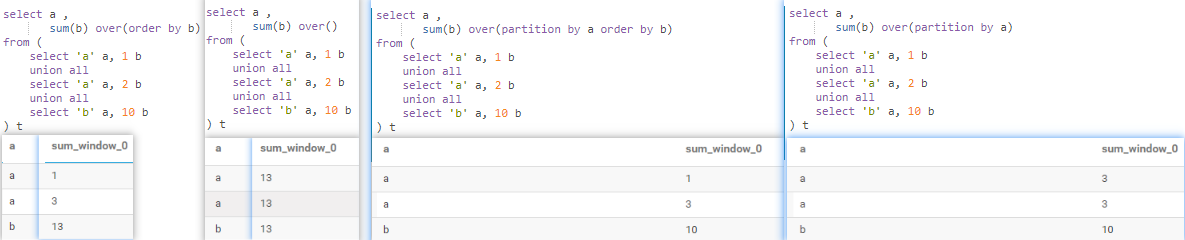
  • over() 全局求和
  • over(order by) 全局累积求和
  • over(partition by ) 分区内全局求和
  • over(partition by order by) 分区内累积求和

内网环境下,下面的脚本分别在 impala,hive,holo,pg , mysql ,执行以下,看下是什么情况

1
2
3
4
5
6
7
8
9
10
11
12
with tmp1 as (
select 'a' as a,1 as b
union all
select 'a' as a , 2 as b
union all
select 'b' as b , 10 as b
)
select a ,
avg(b) over(partition by a order by b) x ,
sum(b) over(partition by a order by b) y
from tmp1
;

关于聚合函数+窗口函数的描述,GreeksforGreeks上的那个博文是错的

侧写视图(lateral view)

🎈explode(split()) 只能用来解决一行转多列的单字段问题,侧写视图主要用来处理,通用行转列的问题

1
2
3
4
5
6
7
8
9
10
11
12
13
14
15
16
17
18
-- hive 语法
with tmp1 as(
select 'A;B;C' as name , 20 as age
)
select explode(split(name,';'))
, age -- Only a single expression in the SELECT clause is supported with UDTF's
-- 如果是多列,使用测斜视图语法
from tmp1
;
-- 如下(hive语法)
with tmp1 as(
select 'A;B;C' as name , 20 as age
)
select name
, age
, col_x
from tmp1 lateral view explode(split(name,';')) x as col_x
;
name age col_x
A;B;C 20 A
A;B;C 20 B
A;B;C 20 C
该表格可左右移动

lag+over的使用

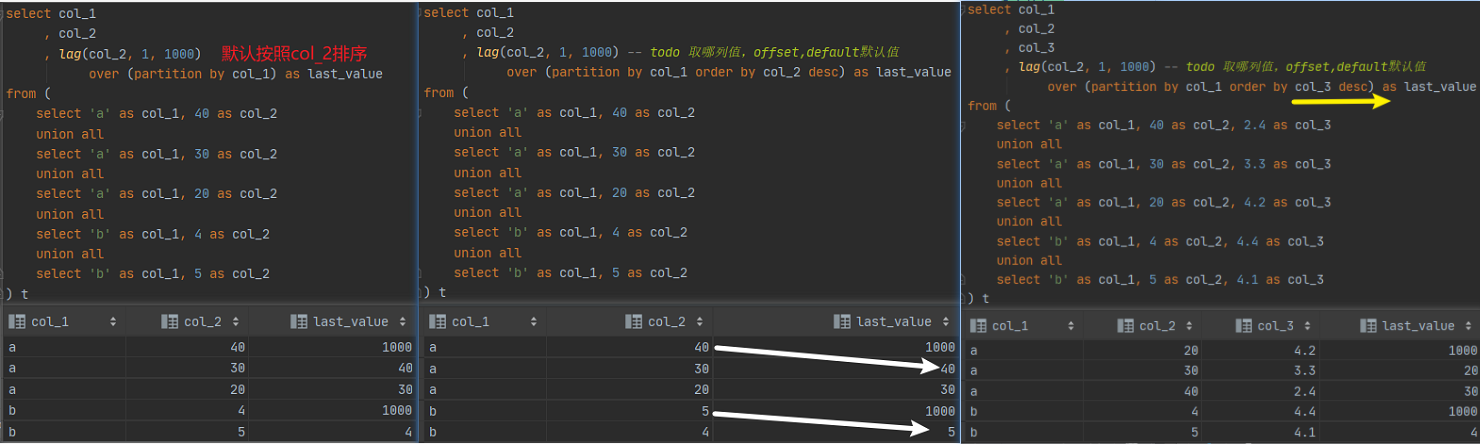
其中最为常用的是:按照时间正序排序,lag获取上个周期的值

Your image description
lag + over 的使用

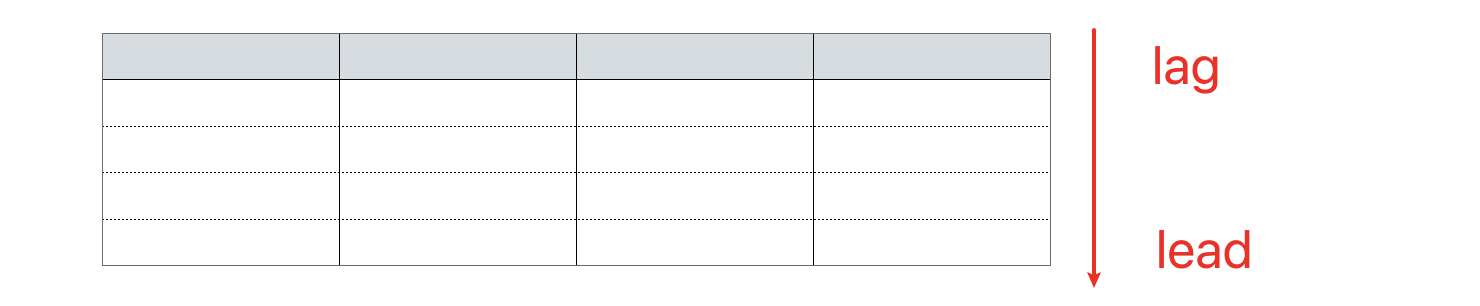
  • lag (落后)是获取上一个
  • lead (领导)是获取下一个

Your image description
SQL(StructuredQueryLanguage)标准认为当前行的上一个行是后面,下一行是前面

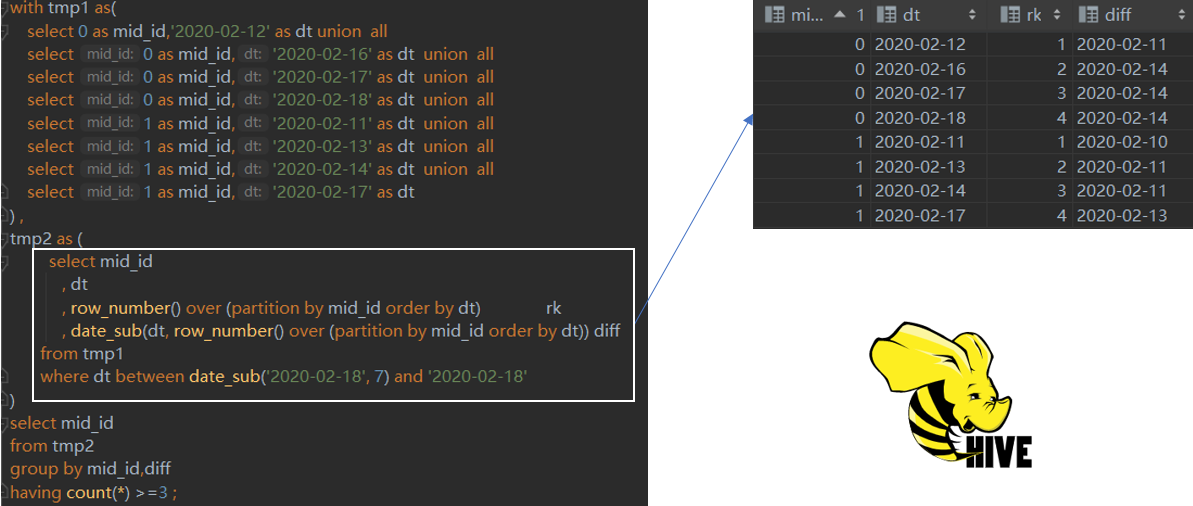
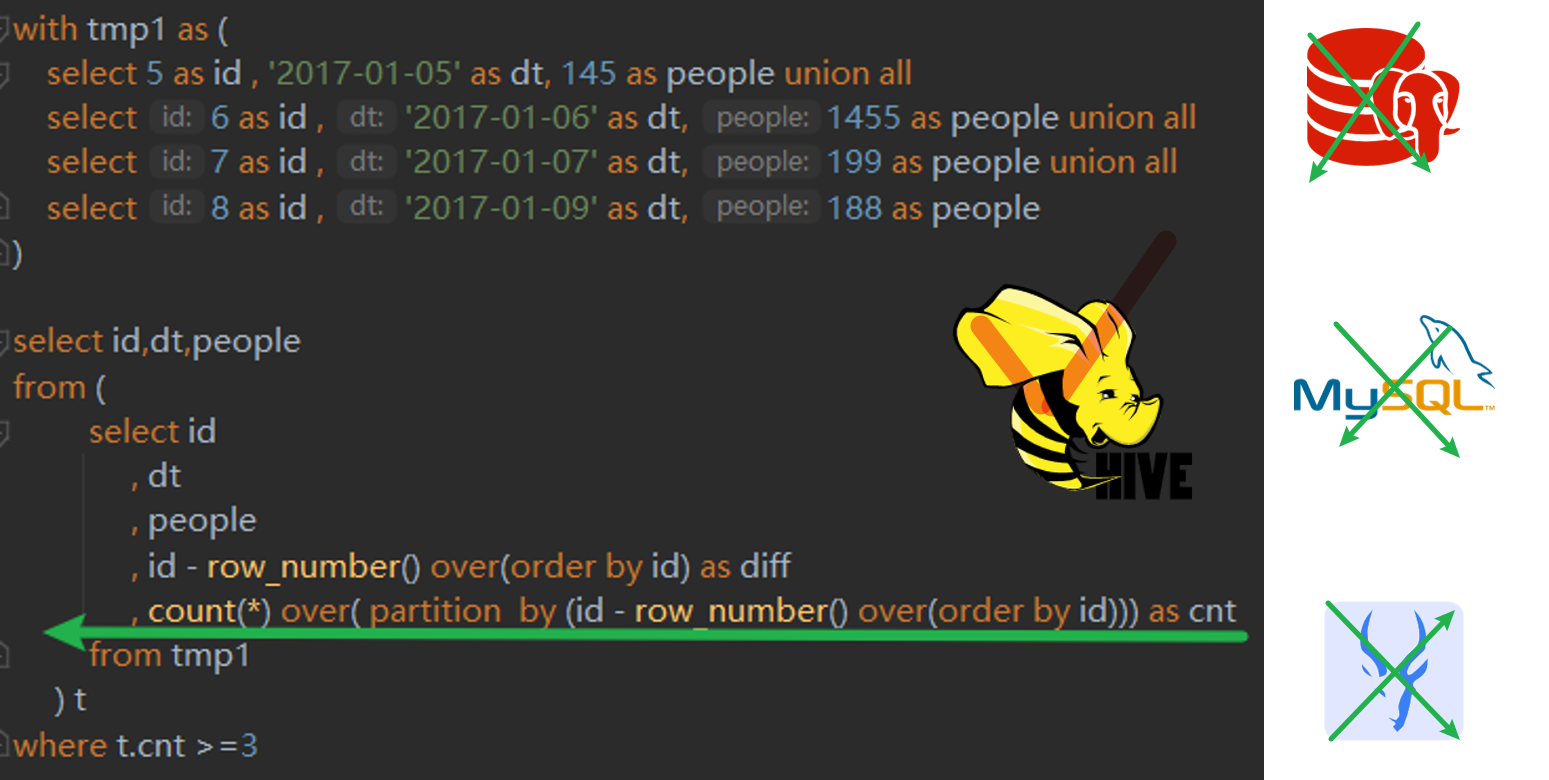
一周内连续3天活跃

Your image description
一周连续X天活跃的最佳解法

1
2
3
4
5
6
7
8
9
10
11
12
13
14
15
16
17
18
19
20
21
22
with tmp1 as(
select 0 as mid_id,'2020-02-12' as dt union all
select 0 as mid_id,'2020-02-16' as dt union all
select 0 as mid_id,'2020-02-17' as dt union all
select 0 as mid_id,'2020-02-18' as dt union all
select 1 as mid_id,'2020-02-11' as dt union all
select 1 as mid_id,'2020-02-13' as dt union all
select 1 as mid_id,'2020-02-14' as dt union all
select 1 as mid_id,'2020-02-17' as dt
) ,
tmp2 as (
select mid_id
, dt
, row_number() over (partition by mid_id order by dt) rk
, date_sub(dt, row_number() over (partition by mid_id order by dt)) diff
from tmp1
where dt between date_sub('2020-02-18', 7) and '2020-02-18'
)
select mid_id
from tmp2
group by mid_id,diff
having count(*) >=3 ;

对于类似的连续X天的问题,最优的解决方案是使用开窗函数,另外的一种解题思路是自关联,关联时,使用 t1.mid_id = t2.mid_id and t1.dt = date_sub(t2.dt,x)的方式

left semi join

关于left semi join 注意2点:

🅰left semi join 要严格区分于left outer join(left join)

🅱 t1 left semi join t2 选列时,不允许出现t2 的字段

1
2
3
4
5
6
7
8
9
10
11
12
13
14
15
16
17
18
19
20
21
22
23
24
25
26
27
28
29
select t1.id, t1.fieldA
from `table_A` t1
where t1.id in (
select id
from `table_B`
); -- A 和 B的 交集

-- 可改写为exists的方式
select t1.*
from `table_A` t1
where exists (
select t2.id
from `table_B` t2
where t1.id = t2.id
)

-- 还可改写为
select t1.*
from `table_A` t1
left join `table_B` t2
on t1.id = t2.id
where t2.id is not null -- A 和 B 的交集
;

-- 改写为 ,这种方式更加高效
select t1.* -- 不允许出现t2 的字段
from `table_A` t1
left semi join `table_B` t2
on t1.id = t2.id;

同理对于not exist

1
2
3
4
5
6
7
8
9
10
11
12
13
14
15
16
17
18
19
20
21
22
23
select t1.*
from `table_A` t1
left join `table_B` t2
on t1.id = t2.id
where t2.id is null -- A中有B中没有
;
-- 我们换成下面的写法
select t1.*
from `table_A` t1
where not exists (
select t2.id
from `table_B` t2
where t1.id = t2.id
) -- A中有B中没有

-- 或者换成下面的写法
select t1.*
from `table_A` t1
where not in (
select t2.id
from `table_B` t2
where t1.id = t2.id
) -- A中有B中没有

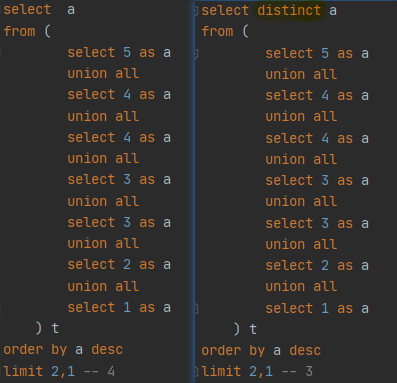
distinct

🅰 distinct 和 order by 的结合

先执行distinct ,后执行order by ,最后limit

Your image description
先执行 distinct ,后执行 order by

🅱 distinct 多个字段

1
2
3
4
5
distinct` 多个字段对所有字段都起作用,并不是一个;如 `select distinct field_a,field_b from table;
a1,b1;
a1,b2;
a2,b2;
-- 只要有不同就会被选择出来

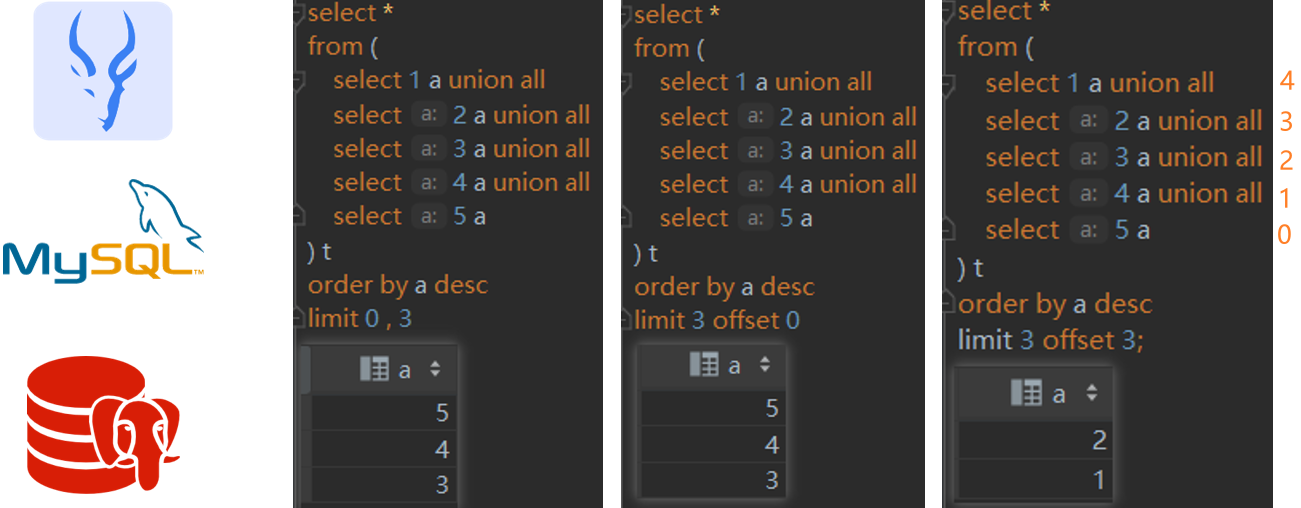
limit offset

1
limit x offset y` ,$y$是$x$的倍数出现,可以恰好将数据取完,`limit x offset y` 等效于 `limit y,x

Your image description
limit 的用法

1
2
3
4
5
6
7
8
9
10
11
12
13
14
select *
from (
select 1 a
union all
select 2 a
union all
select 3 a
union all
select 4 a
union all
select 5 a
) t
order by a desc
limit 3 offset 3;

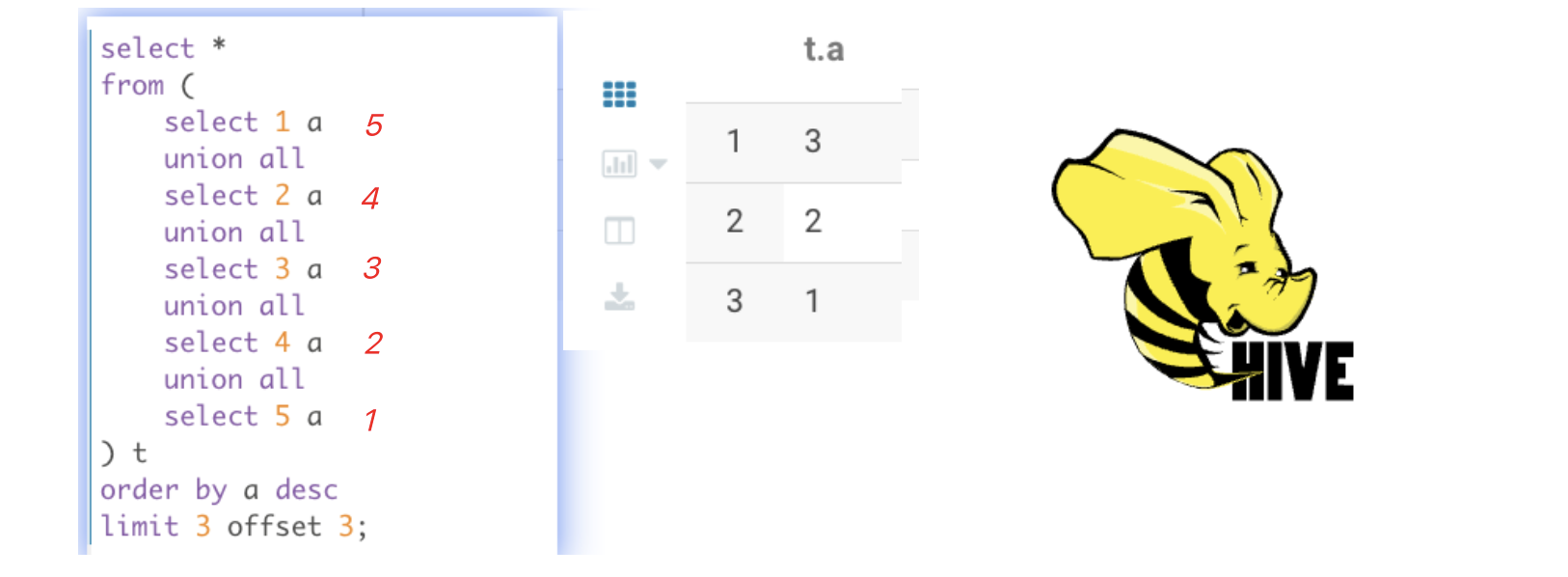
最后一个截图的SQL语句,我在Hive2.1.1中的执行结果是:

Your image description
24

说明在Hive中offset的排序是从1开始的(x取0等于x=1)

ntile+over

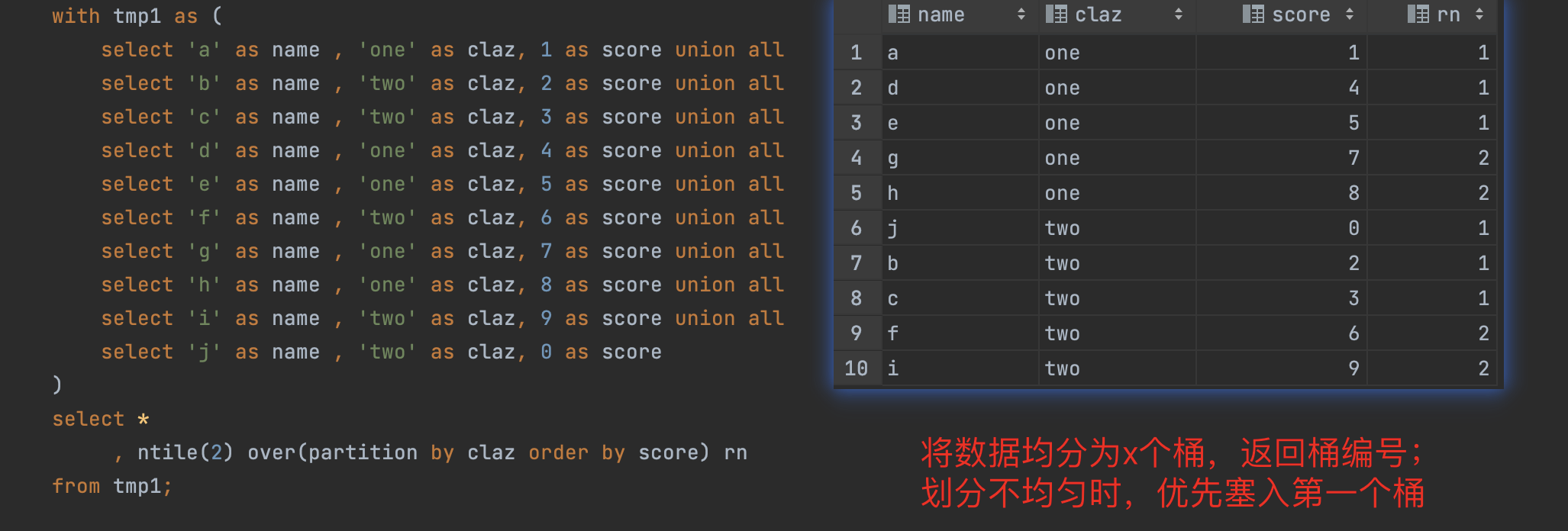
ntile(x)将数据划均分为x个桶,并且返回桶编号,如果有多的元素,优先进入第一个桶

Your image description
使用nile将数据均分到x桶内

1
2
3
4
5
6
7
8
9
10
11
12
13
14
15
with tmp1 as (
select 'a' as name , 'one' as claz, 1 as score union all
select 'b' as name , 'two' as claz, 2 as score union all
select 'c' as name , 'two' as claz, 3 as score union all
select 'd' as name , 'one' as claz, 4 as score union all
select 'e' as name , 'one' as claz, 5 as score union all
select 'f' as name , 'two' as claz, 6 as score union all
select 'g' as name , 'one' as claz, 7 as score union all
select 'h' as name , 'one' as claz, 8 as score union all
select 'i' as name , 'two' as claz, 9 as score union all
select 'j' as name , 'two' as claz, 0 as score
)
select *
, ntile(2) over(partition by claz order by score) rn
from tmp1;

模糊匹配多个字段

图片名称

在hive或者是impala种,或者使用 rlike:其作用在于模糊匹配多个值

1
2
3
4
5
6
7
8
9
10
11
12
13
14
15
16
17
18
19
20
21
22
-- hive & impala
with tmp1 as(
select 'abc大' as a union all
select '中abc' as a union all
select 'abc小' as a
)
select *
from tmp1
-- where a rlike '大|中' -- 写法1
where a regxp '大|中' -- 写法2
-- 中abc
-- abc大

-- holo & pg
with tmp1 as(
select 'abc大' as a union all
select '中abc' as a union all
select 'abc小' as a
)
select *
from tmp1
where a ~ '大|中'

窗口函数的范围选择

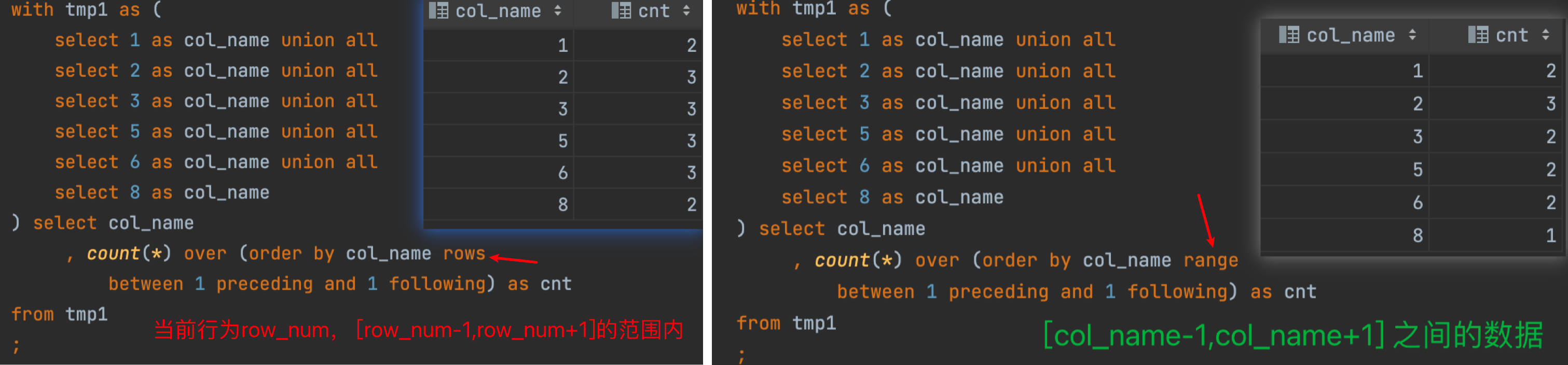
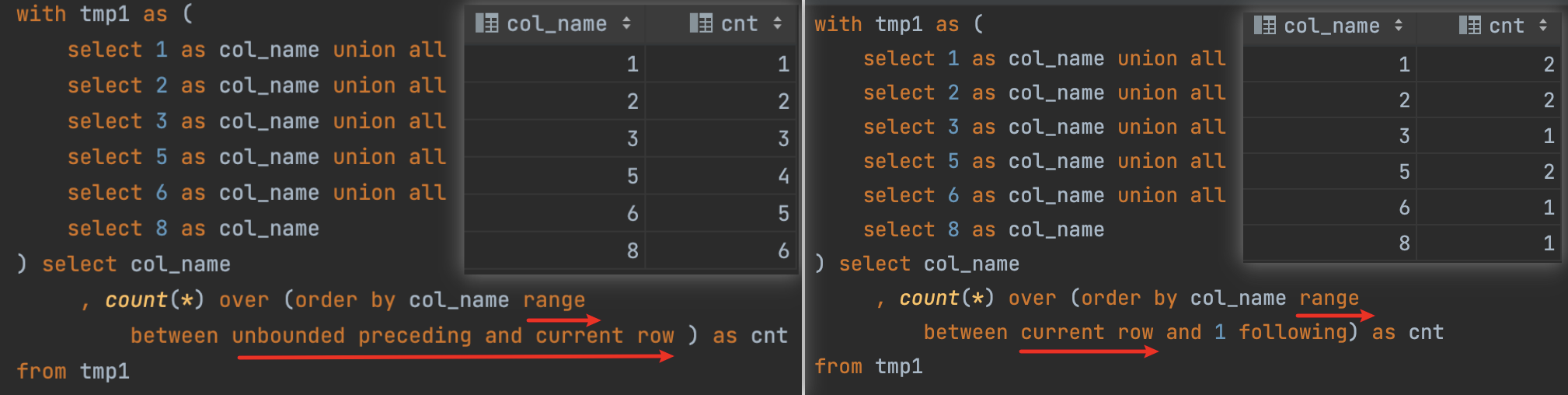
注意 rangerows之间的使用区别: rows计算的是行,range 计算的是值, preceding 往上,following 往下

1
2
3
4
5
agg_func over(order by col_name rows between 1 proceding and 1 following) -- col_name的前后1行
agg_func over(order by col_name range between 1 proceding and 1 following) -- col_name值的(+/- 1) 的值

agg_func over(order by col_name rows between unbounded preceding and unbounded following) -- 全部行
agg_func over(order by col_name rows between unbounded preceding and current row) -- 开头到当前行

Your image description
窗口函数的选择范围

图片名称

第三部分

select 非 group by 字段

MySQL支持,Hive,Impala,PostgreSQL 不支持

对于下面这一段SQL

1
2
3
4
5
6
7
8
9
10
select dept
, emp
, max(sal) as max_sal
from (
select 'A' as dept, 'a1' as emp, 10 as sal union all
select 'A' as dept, 'a2' as emp, 20 as sal union all
select 'B' as dept, 'b2' as emp, 100 as sal union all
select 'B' as dept, 'b1' as emp, 200 as sal
) t
group by dept

1⃣MySQL 通过

Your image description
mysql select 非 group by 的字段

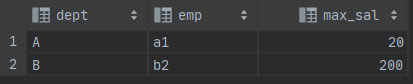
MySQL 选择记录中的第一个记录(从实验结果来看,是记录的第一行)

2⃣ postgreSQL:

1
[42803] ERROR: column "t.emp" must appear in the GROUP BY clause or be used in an aggregate function

3⃣ Hive:

1
Error while compiling statement: FAILED: SemanticException [Error 10025]: line 2:7 Expression not in GROUP BY key 'emp'

4⃣ Impala:

1
AnalysisException: select list expression not produced by aggregation output (missing from GROUP BY clause?): emp

having 过滤是否支持别名

MySQL和Hive是支持的, impala和postgreSQL不支持,🎈:推荐无论何时都不使用别名进行分组后过滤

1
2
3
4
5
6
7
8
9
10
11
12
13
14
select a, count(*) as cnt
from (
select 5 as a
union all
select 4 as a
union all
select 4 as a
union all
select 3 as a
union all
select 3 as a
) t
group by a
having cnt > 1;

上述的SQL在MySQL 和 hive中执行都是没问题的,在impala和postgreSQL报错 column "cnt" does not exist,需要下面的写法

1
2
3
4
5
6
7
8
9
10
11
12
13
14
select a, count(*) as cnt
from (
select 5 as a
union all
select 4 as a
union all
select 4 as a
union all
select 3 as a
union all
select 3 as a
) t
group by a
having count(*) > 1;

order by 字符串

1
2
3
4
5
6
7
8
9
select a
from
(
select 'a' as a union all -- 97
select '' as a union all -- 66
select ' ' as a union all -- 32
select null as a -- 0
) t
order by a desc ;

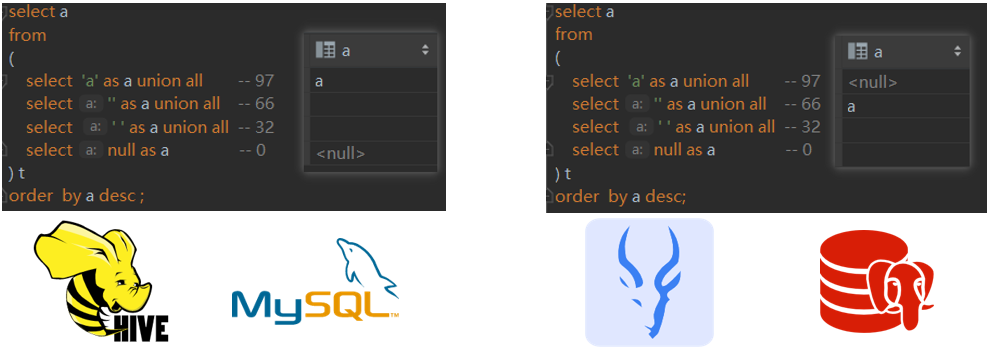
对于以上查询和排序,Hive和MySQL认为NULL是最小;Impala和PostgresSQL认为NULL最大,如果使用explain命令查看SQL的执行计划的话,会明显看到编译器会给SQL添加1个null first / null last的明亮,这个取决于具体的引擎,感兴趣的读者可以自己test下,比如Hive会将null设为最小,impala会将null设为最大

Your image description
null,空串,空格 之间的排序关系

$24/5$的结果

DB/Program Language value
Java / PostgreSQL 4
Hive / Impala / MySQL 4.8

窗口函数是否支持distinct

1
2
3
4
5
6
7
select  A, B , count( distinct A) over()
from (
select 1 as A ,'a' as B union all
select 2 as A ,'b' as B union all
select 1 as A ,'c' as B union all
select 3 as A ,'d' as B
) t

比如以上的SQL查询:Hive是支持的,Impala,MySQL,PostgreSQL暂时没有实现

窗口嵌套

窗口函数的嵌套,只Hive~2.1.1~中是支持的,PostgreSQL(window functions are not allowed in window definitions),MySQL,Impala 中只能多嵌套一层

Your image description
不同的引擎对于窗口嵌套的支持

字符串写入数值类型

1
2
3
4
5
6
create table if not exists  business (
name strng,
order_date string,
cost float
);
insert into business values('xioaming','2021-08-22','');

Hive 会将字符串转为null写入;Impala,MySQL,PostgreSQL会进行类型检查异常

字段截取

1
2
3
4
5
6
7
8
9
10
11
12
13
14
15
16
-- MySql
select substring_index(substring_index('A/B/C/D/E', '/', 4), '/', -1) as dept_name0 -- D

-- hive,索引从0开始
select substring_index(substring_index('A/B/C/D/E', '/', 4), '/', -1) as dept_name0 -- D
, split('A/B/C/D/E', '/')[3] as dept_name1 -- D


-- pg/holo 索引从1开始
select split_part('A/B/C/D/E', '/',4) as dept_name1 -- D
-- impala 索引从1开始
select split_part('A/B/C/D/E', '/',4) as dept_name1 -- D、


-- 其中,holo存在以下函数
select string_to_array('xx~^~yy~^~zz', '~^~') -- {xx,yy,zz}

column_name not in (a) 会过滤掉 null 的记录

column_name not in (a): 出了会过滤掉值为a的记录,还会过滤掉 column_namenull 的记录

1
2
3
4
5
6
7
8
9
10
11
12
13
with tmp1 as (-- 
select 'a' as a
union all
select 'b' as a
union all
select 'c' as a
union all
select null as a
)
select *
from tmp1
where a not in ('a')
-- 结果返回 a,c

Impala 的模糊关联(非等值关联)

1
2
3
4
5
6
7
8
9
10
11
12
-- t2.name 是 t1.name 的子串的时候即返回 true ,注意顺序
with tmp1 as ( --
select '康恩贝/CONBA' as name, '2023-01-01' as live_date
)
, tmp2 as ( --
select 'CONBA' as name, '2023-01-01' as live_date
)
select *
from tmp1 t1
left join tmp2 t2
on t1.live_date = t2.live_date
and t1.name rlike t2.name
name live_date name live_date
康恩贝/CONBA 2023-01-01 CONBA 2023-01-01

第四部分

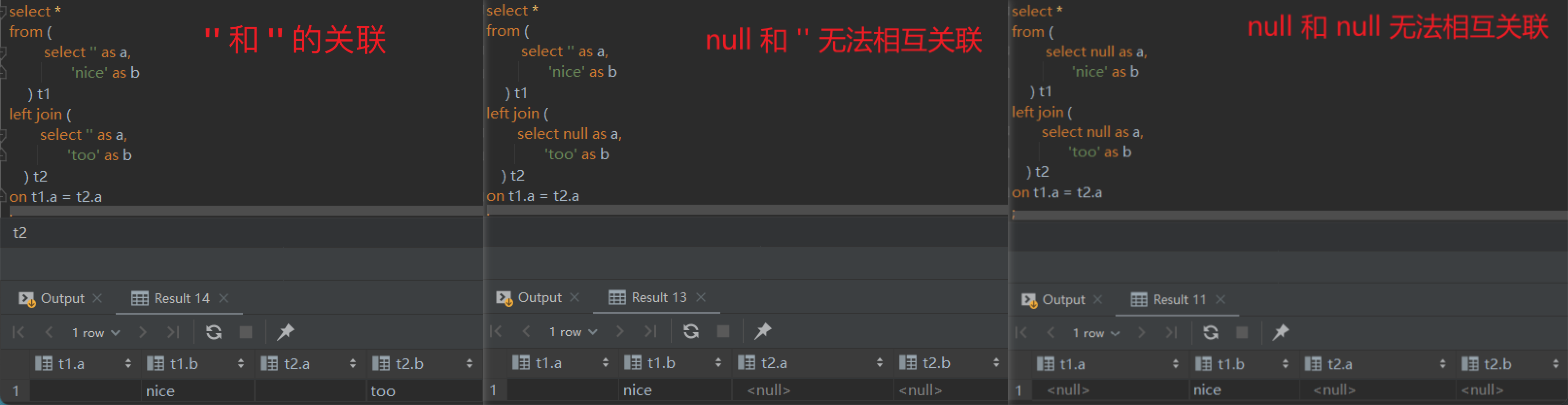
null,x 关联

Your image description
null 和其他值的关联

在任何 SQL(MySQL,PostgreSQL,Hive,Impala)引擎中,null和任意值都无法关联无法相互关联,包括其本身

PostgreSQL中有类型探测,执行以上关联会发生:Failed to find conversion function from unknown to text

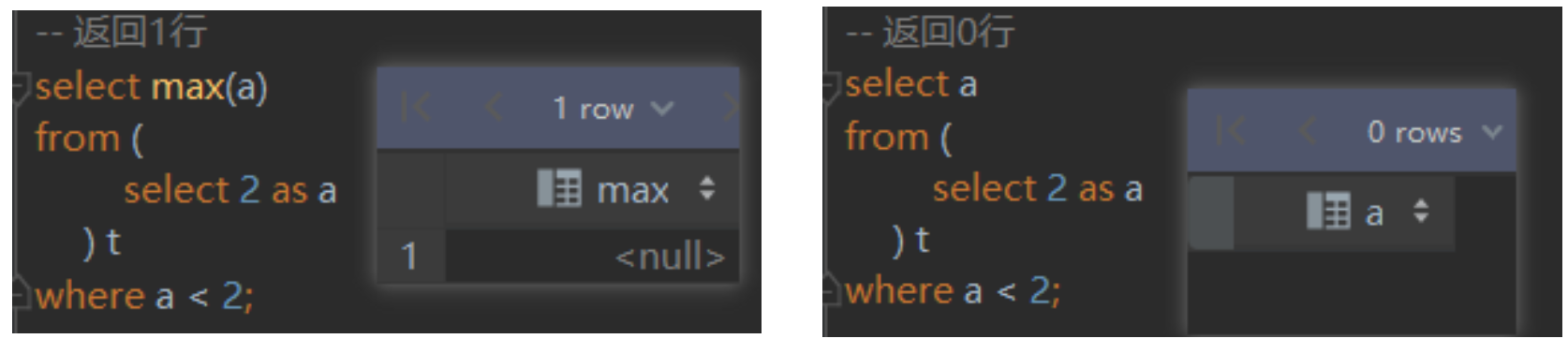
返回1行&返回0行

使用聚合函数,返回的行数一定大于等于1

Your image description
返回0行和返回1行

union all 的类型

任何引擎,union all的类型必须保持一致

组合主键非null

对于test01表,字段a和字段b在作为联合主键时,在字段anull,字段bnull的时候

1⃣kudu将不会写入该记录,不会抛异常,导致写入数据和查询数据记录数不一致

2⃣MySql插入时抛出异常 类似(primary key not null)

3⃣postgresql 插入时抛出异常 类似(primary key not null)

时间戳

时间是人可识别的,时间戳基本是机器识别的,比如2022-01-01 00:00:00(1640966400),前者是时间,后者是时间戳,几乎所有的引擎都实现了 unix_timestamp方法,支持传入一个时间,如果没有传入时间将使用当前的时刻

1⃣ 获取时间戳

1
2
3
4
5
--mysql
select unix_timestamp('2022-01-01 00:00:00');

-- hive
select unix_timestamp('2022-01-01 00:00:00');

2⃣获取时间

1
2
3
4
5
6
7
8
9
10
11
12
-- mysql
select now();

-- hive
select from_unixtime( unix_timestamp());

-- impala
select now(), utc_timestamp(),current_timestamp(),from_unixtime( unix_timestamp());

-- pg
select now() , current_timestamp;

去掉文本中的换行符/回车符/制表符/空格,正则替换

1
2
3
4
5
6
7
8
9
10
11
-- \s 表示匹配一个或者多个空白字符(包括空格、制表符、换行符), '+' 表示匹配前面的模式(即'\s')一次或多次 
select regexp_replace(input_content,'\\s+','') as after_content
-- hive
select regexp_replace(video_desc,'\t|\n|\001|\r','') as video_desc

-- mysql5.7中不支持regexp_replace,8.0中支持,所以在5.7中使用
select replace(replace(video_desc, char(13), ''), char(10), '') as video_desc
select '1\r2\t\3\n4\0015'
,regexp_replace('1\r2\t\3\n4','\\s+','')
,regexp_replace('1 \r2\t\3\n4\0015','\\s+','')
,regexp_replace('1 \r2\t\3\n4\0015','\t|\n|\001|\r','')

Your image description
由于特殊字符导致表错位串行的问题描述

impala upsert + Kudu

本质是insert + update 的结合

  • 主键存在时,全字段更新
  • 主键不存在时,插入

不使用order by 找到工资第二的员工

1
2
3
4
5
6
7
8
9
10
11
12
13
14
15
16
17
18
19
select
e.emp_no,
salary,
last_name,
first_name
from employees e
inner join salaries s
on e.emp_no = s.emp_no
where s.to_date = '9999-01-01'
and s.salary =
(
select s1.salary
from salaries s1
inner join salaries s2
on s1.salary <= s2.salary
where s1.to_date = '9999-01-01' and s2.to_date = '9999-01-01'
group by s1.salary
having count(distinct s2.salary) = 2
)

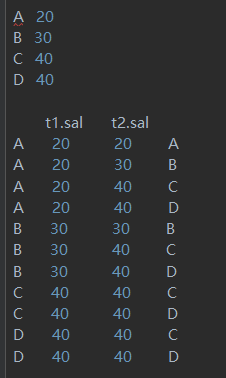
最大值只能小于等于最大值(出现1次);次大值只能小于等于最大值和本身(出现2次)

Your image description
求薪资次高的员工

from tmp1 , tmp2 的本质

from tmp1 , tmp2 的本质就是 inner join的行为

1
2
3
4
5
6
7
8
9
10
11
12
13
14
15
16
17
18
with tmp1 as (select 'a' as name, 10 as age
union all
select 'b' as name, 11 as age
union all
select 'c' as name, 12 as age
)
, tmp2 as (select 'c' as name, 'female' as sex
union all
select 'd' as name, 'male' as sex
union all
select 'e' as name, 'female' as sex
)
select t1.name
, t1.age
, t2.sex
from tmp1 t1
, tmp2 t2
where t1.name = t2.name

上述的SQL等同于下列SQL

1
2
3
4
5
6
7
8
9
10
11
12
13
14
15
16
with tmp1 as (select 'a' as name, 10 as age
union all
select 'b' as name, 11 as age
union all
select 'c' as name, 12 as age
)
, tmp2 as (select 'c' as name, 'female' as sex
union all
select 'd' as name, 'male' as sex
union all
select 'e' as name, 'female' as sex
)
select t1.name, t1.age, t2.sex
from tmp1 t1
inner join tmp2 t2
on t1.name = t2.name

Hive 中强制 mapjoin

1
2
3
4
select /*+ mapjoin(t2)*/  --强制指定关联方式
from t1
left join t2
on t1.key= t2.key

第四部分

ORC存储格式 和 RCFile存储格式的一个问题 - 发生 Unknow Reason问题

union all + distint 的时候需要设置 set hive.vectorized.execution.enabled=false;

spark.yarn.executor.memoryOverhead ,该参数官方地址,出现这个问题提升该参数的阈值是一方面,另一方面可以增加 executor的数量,set spark.dynamicAllocation.maxExecutors=14;

1
2
3
return code 3 from org.apache.hadoop.hive.ql.exec.spark.SparkTask. Spark job failed because of out of memory.

ExecutorLostFailure (executor 10 exited caused by one of the running tasks) Reason: Container killed by YARN for exceeding memory limits. 15.3 GB of 15.3 GB physical memory used. Consider boosting spark.yarn.executor.memoryOverhead

spark.yarn.executor.memoryOverhead是Yarn分配给 executor 的堆外内存

1
2
3
4
5
6
Finished Stage-2_0: 1098(+1,-35) /1099
Finished Stage-2_0: 1099(-35)/1099

-- success/total
-- a(x,y)/b
hive,spark的运行日志,如果a最终等于b,就是task是成功的;

如何获取月初月末

1
2
3
4
5
select trunc(date_add(current_date,-1),'MM') as month_first_day    -- hive  月初
select date_format('2020-01-02 10:09:08','yyyy-MM-01') -- hive
select trunc(current_date,'MM') -- spark-sql ,hive

select last_day(current_timestamp()) -- 月末

如何处理动态分区写入

  1. 开启非严格模式 set hive.exec.dynamic.partition.mode=nonstrict
  2. 动态分区写入注意partition(date_id)的字段和select 后的字段名称保持一致
  3. 动态分区字段放在select 的最后一行

Memory limit exceeded: Could not allocate memory while trying to increase reservation

  1. 最常用的方式是:重试
  2. 降低查询并发度:减少同时执行的查询数量,这样可以为每个查询分配更多的内存
  3. 配置准入控制:Impala 支持准入控制功能,可以限制同时执行的查询数量,避免资源竞争。 Impala Admission Control 文档
  4. 考虑优化查询以降低内存需求(sql 本身,limit 等)

json数组如何解析

如何解析JSON 数组?JSON数组大概长这个样子: [{},{}],以下是解析demo

1
2
3
4
5
6
7
8
select explode(
split(
regexp_replace(
regexp_replace( '[{"skuNo":"KU413455571546619913","propertyValue":"雾霾蓝"},{"skuNo":"KU413455571546619912","propertyValue":"北极绿"},{"skuNo":"KU413455571546619911","propertyValue":"亚麻金"}]',
'\\[|\\]', ''), --将json数组两边的中括号去掉
'\\}\\,\\{', '\\}\\;\\{'), --将json数组元素之间的逗号换成分号
'\\;') --以分号作为分隔符(split函数以分号作为分隔)
)

如何求 当前日期至前7/30天 的聚合值?

1
2
3
4
5
6
7
8
9
10
11
12
13
14
15
16
17
18
with tmp1 as ( -- 求:同一个账号,同一个商品,在包含直播日期内的7天内,播过多少次?
select '1424128656' as account_id, '259183220' as goods_id, '2022-06-28' live_date
union all
select '1424128656' as account_id, '259183220' as goods_id, '2022-06-22' live_date
union all
select '1424128656' as account_id, '259183220' as goods_id, '2022-06-17' live_date
union all
select '1424128656' as account_id, '259183220' as goods_id, '2022-06-15' live_date
union all
select '1424128656' as account_id, '262220152' as goods_id, '2021-12-09' live_date
)
select *
, count(*)
over (partition by account_id,goods_id
order by unix_timestamp(live_date, 'yyyy-MM-dd') desc
range between 1 following and 604800 following) + 1 as day_7 -- 过去包含今天在内的7天内出现了多少次

from tmp1
account_id goods_id live_date day_
1424128656 259183220 2022-06-28 2
1424128656 259183220 2022-06-22 3
1424128656 259183220 2022-06-17 2
1424128656 259183220 2022-06-15 1
1424128656 262220152 2021-12-09 1

Hive,cast( as int) into bigint 时,数据都是0

Hive中

1
2
3
4
5
6
7
8
-- table_A 中 A字段的类型为 bigint

insert into table table_A
select cast(a as int) as A

-- 最后查询 A的数据为,均为0

-- solutions : 2边类型保持一致即可

时间A在B时间开始后的第几个小时

确定A 时间( on_top_time )在 B时间 (start_time) 的第几个小时内,相当于求相对位置问题(5相对于1的位置是多少)

1
2
3
4
5
6
7
8
9
10
11
12
13
14
15
with tmp1 as ( -- 
select '2023-01-01 12:00:00' as on_top_time, '2023-01-01 11:00:00' as start_time
union all
select '2023-01-01 12:02:00' as on_top_time, '2023-01-01 11:00:00' as start_time
union all
select '2023-01-01 12:59:00' as on_top_time, '2023-01-01 11:00:00' as start_time
union all
select '2023-01-01 16:00:00' as on_top_time, '2023-01-01 11:00:00' as start_time

)
select on_top_time as on_top_time
, start_time as start_time
, cast((unix_timestamp(on_top_time) -
unix_timestamp(start_time)) / 3600 + 1 as int) as hours_id
from tmp1

is not in the vectorization context column map

Hive vectorization union all problem 一文中,提出了一定的解决方案,但是没有写出原因

1
2
-- 在计算时不使用向量化计算
set hive.vectorized.execution.enabled=false

如何处理数据倾斜?

当你遇到下面倾斜的问题的时候:假设A表在 id = 1 有大量的数据,针对这种倾斜场景,有2种处理方式:
方式 🅰

1
2
3
4
5
6
7
8
9
10
11
12
13
14
15
16
17
18
19
20
-- 原有的逻辑是:
select A.id
from A
join B
on A.id = B.id

-- 改进后的逻辑,第一部分,该部分查询不会有任何倾斜
select A.id
from A
join B
on A.id = B.id
where A.id <> 1

-- 改进后的逻辑,第二部分,B.id=1的数据量很小,我们将其放入内存关联,在spark种叫广播关联,在hive中叫做 map-join
select /*+ mapjoin(B)*/ A.id
from A
join B
on A.id = B.id
where A.id = 1
and B.id = 1

方式 🅱

通过增加随机数 列的方式,增加关联键,举个例子:对于A表

1
2
3
4
5
6
7
8
9
10
11
12
13
14
15
16
17
18
19
20
21
22
23
24
id
a
a
a
a
-- 将变成
id rand_column(0~2)
a 0
a 1
a 2
a 2

对于B表
```sql
id
a
-- 将变成
id rand_num
a 0
a 1
a 2

假设之前的关联关系是 A.id = B.id,为了处理倾斜,我们间关联关系修改为:
`A.id = B.id and A.rand_num = B.rand_num`

如何为Hive表增加一列?

1
`alter table dw.live_thin_room_order_goods_df  add columns (third_party_shop_id string comment '三方店铺id')`

生成日期维度列

1
2
3
4
5
-- 在hive中
select date_add("2023-08-01", a.pos) as range_date
from (
select posexplode(split(repeat("@", datediff("2023-08-31", "2023-08-01")), "@")) -- 第一个日期终止日期,第二个日期起始日期,
) a

维表生成,使用 date_id = '2023-08-08' 的日期生成 date_id = '2023-08-08' 之前的日期

1
2
3
4
5
6
7
8
9
10
11
12
13
set hive.exec.dynamic.partition.mode=nonstrict;
insert overwrite table target_table partition (date_id)
select id as id
, name as name
, t1.date_id
from (select date_add("2023-02-01", a.pos) as date_id
from (select posexplode(split(repeat("@", datediff("2023-08-08", "2023-02-01")), "@")) -- 第一个日期终止日期,第二个日期起始日期,
) a
) t1
cross join (select *
from target_table
where date_id = '2023-08-09'
) t2
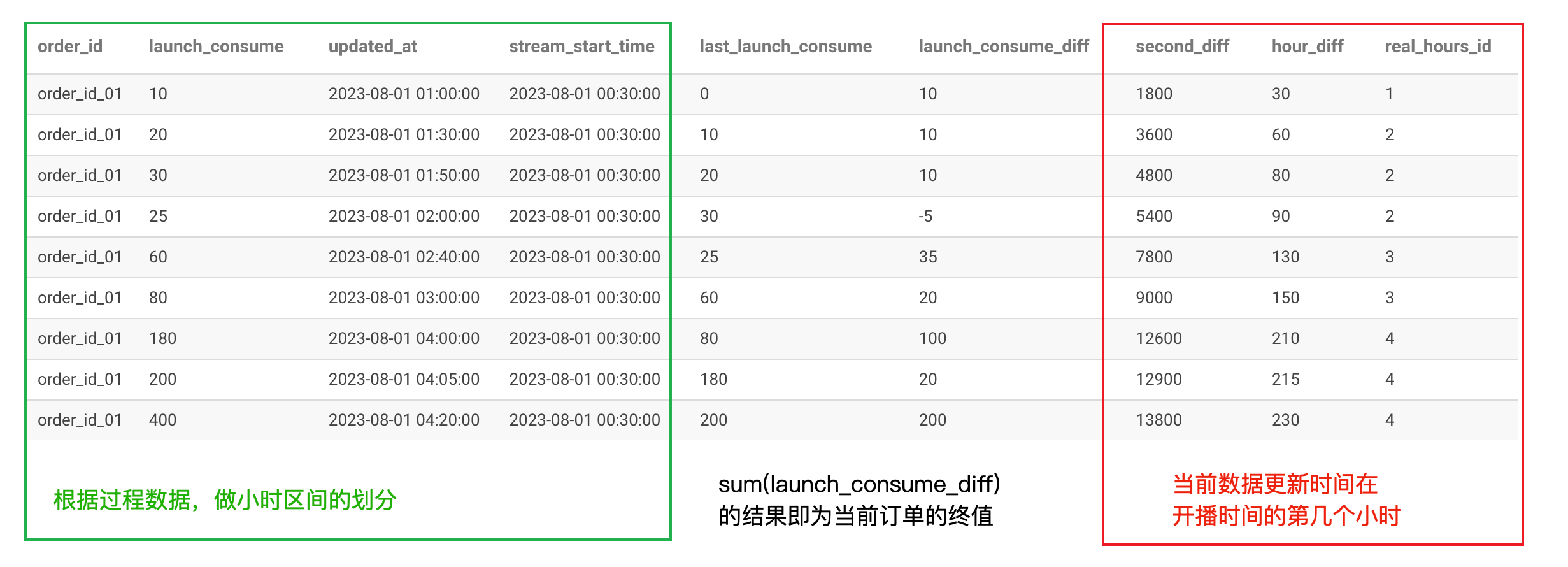
如何将过程数据划分到小时

场景描述:现在有一个网页的页面,爬虫读取数据,每分钟读取一次,并且落库,需求是得到每个小时的增量数据

Your image description
info about the picture

以上的代码如下

1
2
3
4
5
6
7
8
9
10
11
12
13
14
15
16
17
18
19
20
21
22
23
24
25
26
27
28
29
30
31
32
33
34
35
with tmp1 as ( -- l_c : launch_consume, up_at : updated_at, s_at: start_time , s_diff 更改时间距离开始时间多少秒
select 'o_01' as o_id, 10 as l_c, '2023-08-01 01:00:00' as up_at, '2023-08-01 00:30:00' as s_at
union all
select 'o_01' as o_id, 20 as l_c, '2023-08-01 01:30:00' as up_at, '2023-08-01 00:30:00' as s_at
union all
select 'o_01' as o_id, 30 as l_c, '2023-08-01 01:50:00' as up_at, '2023-08-01 00:30:00' as s_at
union all
select 'o_01' as o_id, 25 as l_c, '2023-08-01 02:00:00' as up_at, '2023-08-01 00:30:00' as s_at
union all
select 'o_01' as o_id, 60 as l_c, '2023-08-01 02:40:00' as up_at, '2023-08-01 00:30:00' as s_at
union all
select 'o_01' as o_id, 80 as l_c, '2023-08-01 03:00:00' as up_at, '2023-08-01 00:30:00' as s_at
union all
select 'o_01' as o_id, 180 as l_c, '2023-08-01 04:00:00' as up_at, '2023-08-01 00:30:00' as s_at
union all
select 'o_01' as o_id, 200 as l_c, '2023-08-01 04:05:00' as up_at, '2023-08-01 00:30:00' as s_at
union all
select 'o_01' as o_id, 400 as l_c, '2023-08-01 04:20:00' as up_at, '2023-08-01 00:30:00' as s_at
)
, tmp2 as ( --
select o_id as o_id
, l_c as l_c
, up_at as up_at
, s_at as s_at
, lag(l_c, 1, 0) over (partition by o_id order by up_at) as l_l_c

, l_c - lag(l_c, 1, 0) over (partition by o_id order by up_at) as l_c_diff
, (unix_timestamp(up_at) - unix_timestamp(s_at)) as s_diff
, (unix_timestamp(up_at) - unix_timestamp(s_at)) / 3600 as hour_diff
, cast((unix_timestamp(up_at) -
unix_timestamp(s_at)) / 3600 + 1 as int) as real_hours_id
from tmp1
)
select *
from tmp2

动态参数

实现效果:当某一列没有传参时,将 where 当前列的过滤逻辑去除

1
2
where case when ${param} = '你预设的参数' then ture
else platform_name = ${param}

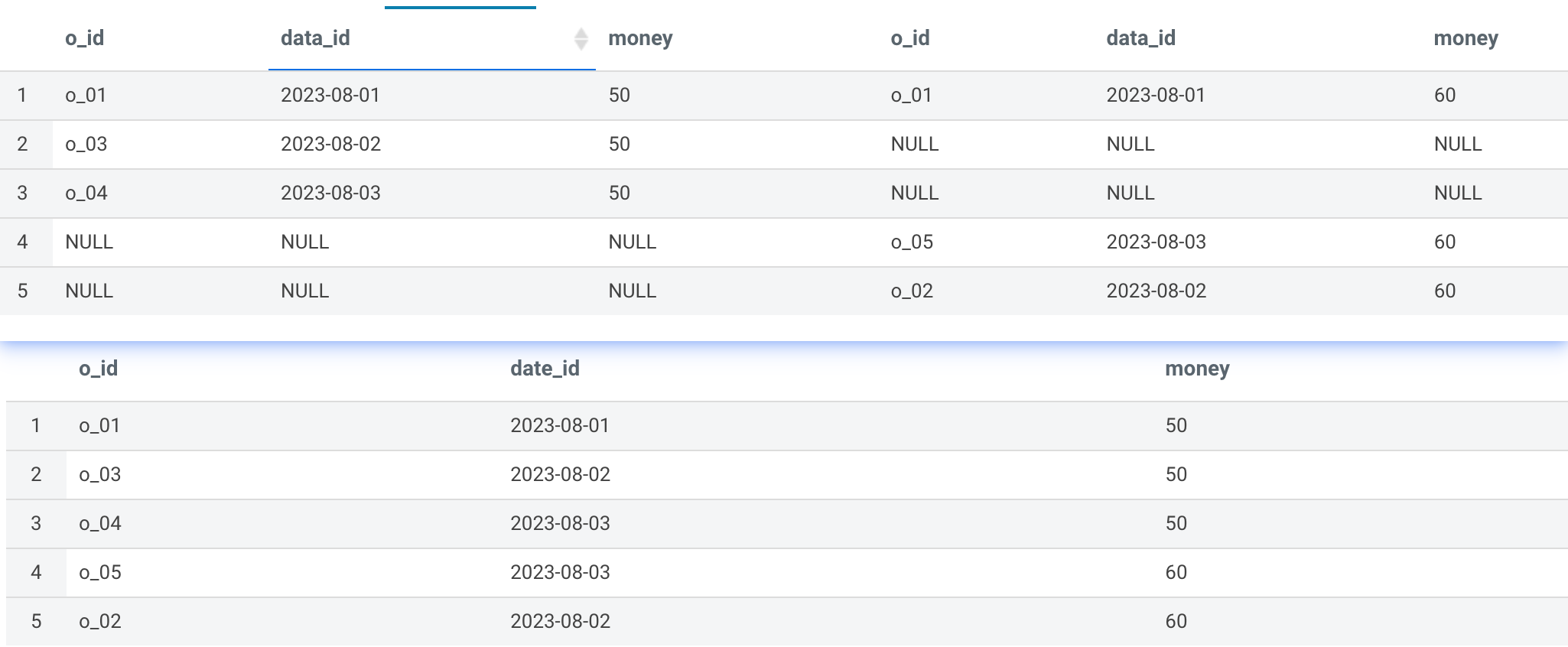
多字段 full join

1
2
3
4
5
6
7
8
9
10
11
12
13
14
15
16
17
18
19
20
21
22
23
with tmp1 as (
select 'o_01' as o_id, '2023-08-01' as data_id, 50 as money
union all
select 'o_03' as o_id, '2023-08-02' as data_id, 50 as money
union all
select 'o_04' as o_id, '2023-08-03' as data_id, 50 as money

)
, tmp2 as ( --
select 'o_01' as o_id, '2023-08-01' as data_id, 60 as money
union all
select 'o_02' as o_id, '2023-08-02' as data_id, 60 as money
union all
select 'o_05' as o_id, '2023-08-03' as data_id, 60 as money
)
select if(t1.data_id is not null, t1.o_id, t2.o_id) as o_id
, if(t1.data_id is not null, t1.data_id, t2.data_id) as date_id
, coalesce(t1.money, t2.money) as money
from tmp1 t1
full join tmp2 t2
on t1.o_id = t2.o_id
and t1.data_id = t2.data_id

Your image description
从 select * 到 select 判断逻辑

第 X 部分

这里继续收录一下问题或者解决方案,ToDo